This document will help you understand how to contribute to our projects, whether you are a scientist looking to add new modules or a developer.
Related Projects
mcp.science: A Collection of Scientific Servers
The mcp.science repository is a community-maintained collection of MCP (Modern Computational Platform) servers specifically packaged for scientific use cases. It contains a variety of powerful tools, such as GROMACS for molecular dynamics and AlphaFold for protein structure prediction, ready to be deployed and used within the MCP ecosystem.
Contributions to this project typically involve packaging a new scientific tool as an MCP server and adding it to the collection, or improving the functionality and efficiency of an existing one. This is the primary way for developers to add new scientific capabilities to the platform.
MCPM and its registry
MCPM is an open source CLI tool for managing MCP servers. It provides a simplified global configuration approach where you install servers once and organize them with profiles, then integrate them into any MCP client. Features include server discovery through a central registry, direct execution, sharing capabilities, and client integration tools.
MCPM Registry, maintained within the same mcpm.sh repository, serves as the central directory for all community-contributed servers (packages). When you use MCPM to search for or install a new scientific tool, it queries this registry. For scientists, contributing to the ecosystem means packaging your work as a server and adding it to this registry, making it discoverable and usable by others.
How to Contribute
mcp.science
If you’re We enthusiastically welcome contributions to MCP.science! You can help with improving the existing servers, adding new servers, or anything that you think will make this project better.
If you are not familiar with GitHub and how to contribute to a open source repository, then it might be a bit of challenging, but it’s still easy for you. We would recommend you to read these first:
In short, you can follow these steps:
- Fork the repository to your own GitHub account
- Clone the forked repository to your local machine
- Create a feature branch (
git checkout -b feature/amazing-feature) - Make your changes and commit them (
git commit -m 'Add amazing feature') Click to see more conventions about directory and naming
Please create your new server in the servers folder. For creating a new server folder under repository folder, you can simply run (replace your-new-server with your server name)
uv init --package --no-workspace servers/your-new-server
uv add --directory servers/your-new-server mcp
This will create a new server folder with the necessary files:
servers/your-new-server/
├── README.md
├── pyproject.toml
└── src
        └── your_new_server
        └── __init__.py
You may find there are 2 related names you might see in the config files:
- Project name (hyphenated): The folder, project name and script name in
pyproject.toml, e.g.your-new-server. - Python package name (snake_case): The folder inside
src/, e.g.your_new_server. - Push to the branch (
git push origin feature/amazing-feature) - Open a Pull Request
Please make sure your PR adheres to:
- Clear commit messages
- Proper documentation updates
- Test coverage for new features
Contributor Recognition in Subrepos
If you want to recognize contributors for a specific server/subrepo (e.g. servers/gpaw-computation/), you can use the All Contributors CLI in that subdirectory.
More information
Please check the instruction of GitHub repo.
MCPM registry
We’re continually exploring better ways to make your contribution process more convenient.
There are 2 ways to add your server to the registry currently:
1. Create a GitHub Issue
Simply create a new GitHub issue with “MCP Server Submission” template:
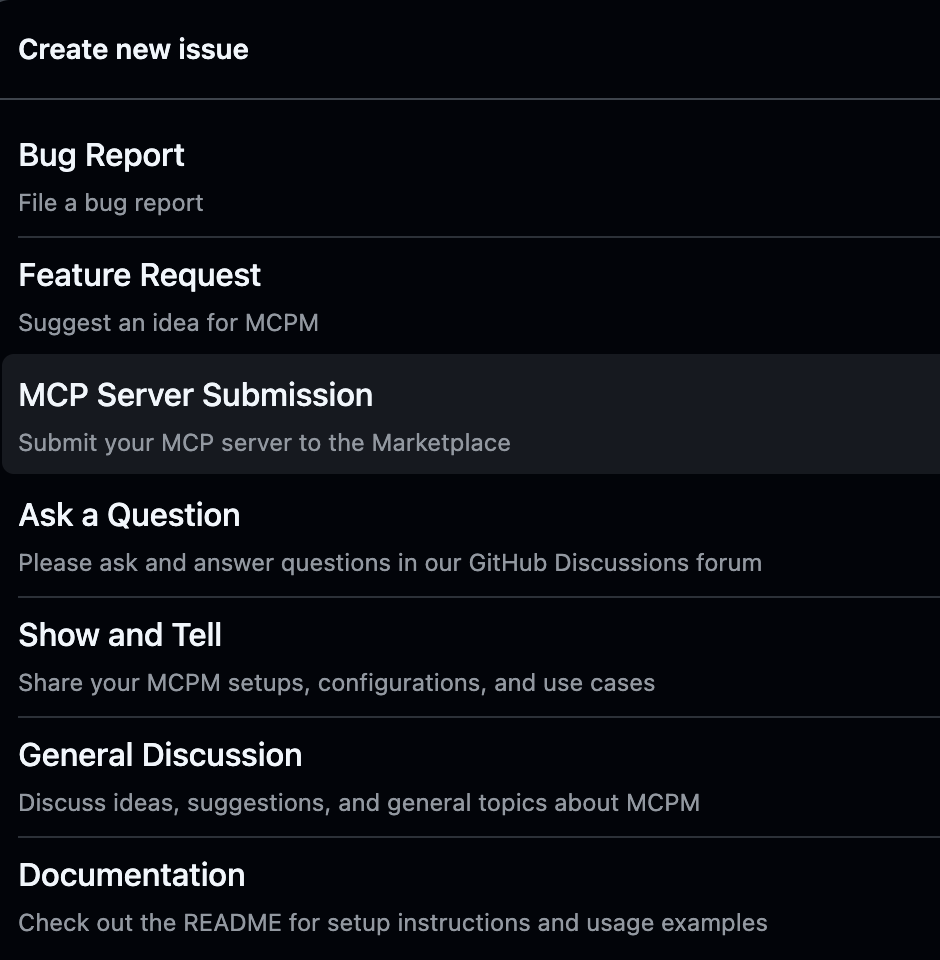
We’ll generate the necessary files and create a PR for you
2. Manually submit a Pull Request
For more control over your submission:
- Fork this repository
- Create a JSON file in
mcp-registry/servers/named[your-server-name].json. The JSON should follow our schema - Validate locally to ensure correct schema:
python scripts/validate_manifest.py | grep "your-server-name"
If validation succeeds, you should see:✓ your-server-name: Valid - Submit a pull request
 Registry Structure
mcp-registry/
├── README.md               # Overview, usage instructions
├── servers/                # Directory containing all registered servers
│   ├── [server-1-name].json   # Server metadata and configuration
│   ├── [server-2-name].json
│   └── ...
└── schema/                 # Schema definitions
    └── server-schema.json  # JSON Schema for server validation
More information
Please check the instruction of GitHub repo